 Notilus Steeler
Commands
Select a command from the left to view details and sub-tabs.
Select a command from the left to view details and sub-tabs.
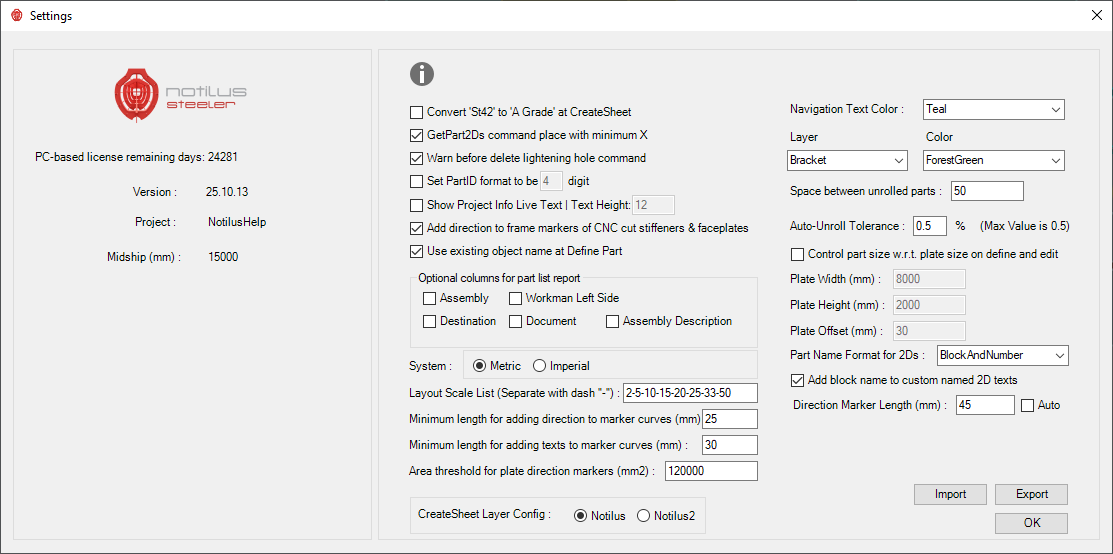
Detailed descriptions of all parameters available in the Notilus Steeler Settings dialog.
| Setting | Description |
|---|---|
| Convert 'St42' to 'A Grade' at CreateSheet | Converts steel grade “St42” to “A Grade” when creating cutting sheets. |
| GetPart2Ds command place with minimum X | Places generated 2D parts starting from the minimum X coordinate. |
| Warn before delete lightening hole command | Prompts before deleting lightening holes from the model. |
| Set PartID format to be [4] digit | Defines the number of digits in automatically generated Part IDs. |
| Show Project Info Live Text | Text Height [12] | Displays live project information text in drawings using the chosen height. |
| Add direction to frame markers of CNC cut stiffeners and faceplates | Adds directional arrows to CNC frame markers for stiffeners and faceplates. |
| Use existing object name at Define Part | Preserves the original Rhino object name when defining parts. |
| Optional columns for part list report | Adds extra fields (Assembly, Destination, Document, etc.) to the part list report. |
| System: Metric / Imperial | Selects the working unit system. |
| Layout Scale List | Defines available scales for drawing layouts (e.g. 2.5–10–25–33–50). |
| Minimum length for adding direction to marker curves | Sets the minimum curve length required to place direction arrows. |
| Minimum length for adding texts to marker curves | Sets the minimum curve length required to place text annotations. |
| Area threshold for plate direction markers | Defines the minimum plate area for showing direction markers. |
| Navigation Text Color | Defines the color for navigation or reference texts. |
| Layer / Color | Default layer and color for drawing elements (e.g. Bracket, ForestGreen). |
| Space between unrolled parts | Distance between flattened parts in nesting layouts. |
| Auto-Unroll Tolerance | Maximum deviation allowed during automatic unroll (default 0.5). |
| Control part size w.r.t. plate size on define and edit | Ensures that defined parts fit within their assigned plate size. |
| Plate Width / Height / Offset | Defines default dimensions and edge offset of plates. |
| Part Name Format for 2Ds | Defines how 2D part names are composed (e.g. BlockAndNumber). |
| Add block name to custom named 2D texts | Automatically appends the block name to 2D text labels. |
| Direction Marker Length / Auto | Defines the default marker arrow length (Auto adjusts automatically). |
| CreateSheet Layer Config | Selects the layer configuration (Notilus1 / Notilus2) for sheet creation. |
| Import / Export | Imports or exports the current configuration to a file. |
| OK | Saves all changes and closes the settings window. |