
 Notilus Clipper
Panel Sections
Select a section from the left to view details.
Select a section from the left to view details.
New Clipping Plane Management Features
Dynamic Section with Clipping Plane
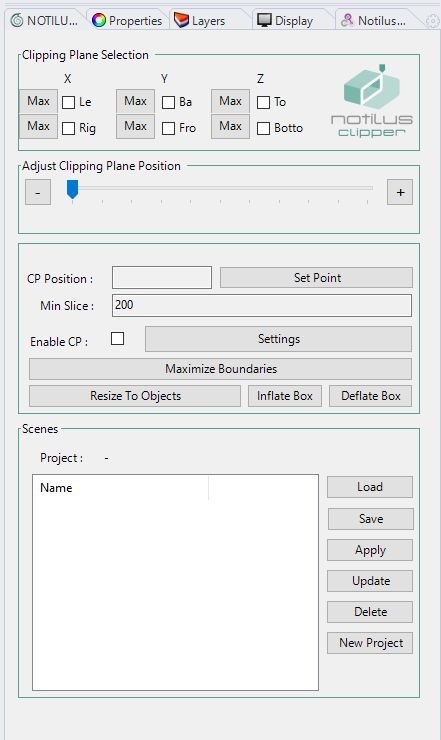
Notilus Clipper is a Rhino panel that gives you precise, interactive control over clipping planes. Unlike Rhino's built-in clipping plane objects, Clipper lets you select the axis, position, and boundaries in a single docked panel — and save named scenes to switch between views instantly.
In the Clipping Plane Selection section, check the axis (X, Y, or Z) and the side (Left/Right, Back/Front, Top/Bottom) you want to clip. Multiple axes can be active simultaneously.
Use the Position Slider to move the clipping plane along the selected axis. Type an exact value in the CP Position field, or click Set Point to pick a point directly in the viewport.
Click Resize To Objects to snap the clipping boundary to the bounding box of all objects, or use Inflate Box / Deflate Box to expand or contract the boundary. Maximize Boundaries extends the clip to the full model extent.
Enter a project name in the Scenes section, give the current clipping state a name, and click Save. Switch between saved scenes with Load and Apply — ideal for section drawings, interior reviews, and presentation views.
Notilus Clipper e un pannello Rhino che offre un controllo preciso e interattivo sui piani di taglio, direttamente da un pannello agganciato.
Nella sezione Selezione Piano di Taglio, seleziona l'asse (X, Y o Z) e il lato. Piu assi possono essere attivi contemporaneamente.
Usa il Cursore di Posizione per spostare il piano di taglio lungo l'asse selezionato. Inserisci un valore esatto nel campo Posizione CP o clicca Imposta Punto per selezionare un punto nel viewport.
Clicca Ridimensiona sugli Oggetti per adattare il confine di taglio al bounding box di tutti gli oggetti, o usa Espandi Box / Riduci Box per espandere o contrarre il confine.
Inserisci un nome progetto nella sezione Scene, assegna un nome alla configurazione di taglio corrente e clicca Salva. Passa tra le scene salvate con Carica e Applica.