
 Notilus AI
Features
Select a feature from the left to view details.
Select a feature from the left to view details.
NotilusAI Use Case: Get Lengths of Longest Edges
The Future of Rhino Design with AI-Powered Scripting
Notilus AI is a Rhino panel that lets you describe a task in plain language, generates a RhinoScript automatically, runs it directly in your open Rhino file, and saves the result for re-use. No scripting knowledge required.
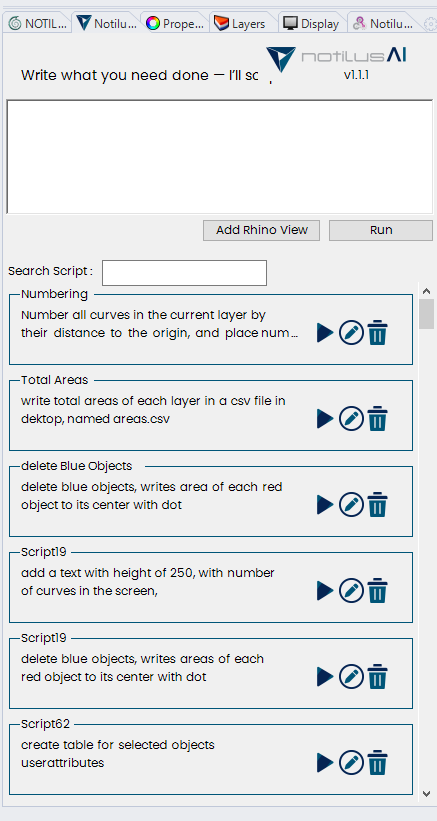
Type a plain-language description of what you want done into the prompt field at the top of the panel — for example: "Number all curves in the current layer by their distance to the origin" or "Write total areas of each layer to a CSV file on the desktop".
Click Add Rhino View to capture the current viewport and attach it as context for the AI. This is useful when the task involves visible geometry that is hard to describe in text — the AI can see the state of your model.
Click Run. Notilus AI sends your prompt (and optional view) to the AI, receives a generated script, and executes it immediately in Rhino. Output and results appear directly in the Rhino viewport and command line.
Every script you run is saved automatically in the Script Library below the prompt area. Use the Search Script field to filter saved scripts by keyword. For any saved script you can:
Notilus AI e un pannello Rhino che ti permette di descrivere un'attivita in linguaggio semplice, genera automaticamente uno script RhinoScript, lo esegue direttamente nel file Rhino aperto e salva il risultato per riutilizzarlo. Nessuna conoscenza di scripting richiesta.
Scrivi una descrizione in linguaggio semplice di quello che vuoi fare nel campo prompt in cima al pannello — ad esempio: "Numera tutte le curve nel layer corrente per distanza dall'origine" o "Scrivi le aree totali di ogni layer in un file CSV sul desktop".
Clicca Aggiungi Vista Rhino per catturare il viewport corrente e allegarlo come contesto per l'AI. Utile quando il compito riguarda geometria visibile difficile da descrivere a testo.
Clicca Esegui. Notilus AI invia il tuo prompt all'AI, riceve uno script generato e lo esegue immediatamente in Rhino. Output e risultati appaiono direttamente nel viewport Rhino e nella riga di comando.
Ogni script eseguito viene salvato automaticamente nella Libreria Script. Usa il campo Cerca Script per filtrare per parola chiave. Per ogni script salvato puoi: